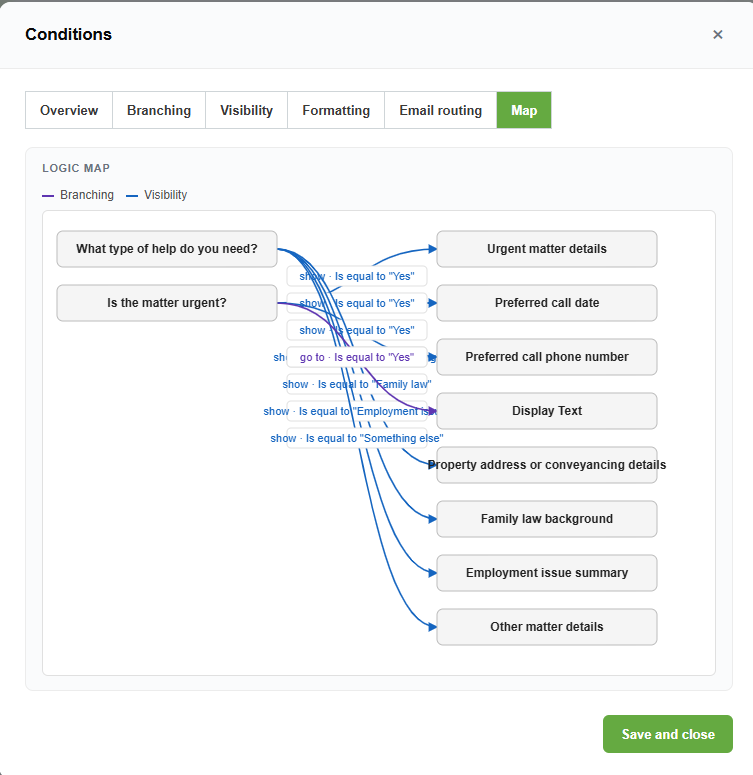
Conditional logic is powerful. It can also get hard to follow once a form grows.
If one answer shows three fields, another answer jumps to a different page, and a third answer hides a section, it is easy to lose track of how the form really behaves.
The visual conditional-logic map is designed to make that easier.
A clearer view of form flow
The logic map gives you a more visual way to understand how a form moves from one question to the next.
- It can help show:
- Branching rules
- Visibility rules
- Multi-target show and hide behaviour
- Branch anchors
- Page flow
Instead of checking each rule one by one, you can see the shape of the form logic more clearly.
Multi-target visibility rules
Forms often need to show or hide more than one thing at a time.
For example, if someone selects “Business customer”, you may want to show:
- Company name
- GST number
- Accounts contact
- Purchase order field
Multi-target visibility rules help keep that sort of setup tidy.
Branch anchors
Branch anchors help control where a person lands when a form jumps forward.
That is useful for longer forms where you do not just want to send someone to a page, but to a particular point in the form experience.
Easier to build, easier to review
The goal is simple: make form logic easier to understand before real people start using the form.
When logic is easier to see, it is easier to fix, easier to explain, and easier to trust.